
15:24Machine-translated from Azerbaijani by AIRead in Azerbaijani
Google begins rolling out AI scam protection in its messaging app
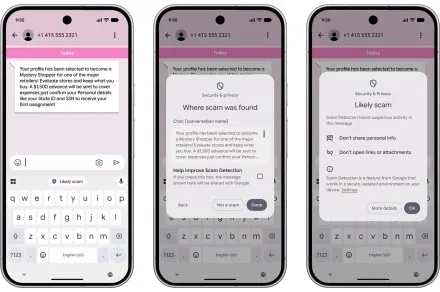
Google has begun rolling out an “Enhanced Protection” mode in the Google Messages app for Android users. This optional feature uses artificial intelligence to detect scam messages and suspicious links. The system also attempts to recognize conversations that initially appear normal but later turn into requests for money or personal information. “Standard Protection” remains the default option in the app. The scam detection feature uses Gemini cloud models to check conversations with people who are not in the user’s contact list. The goal is to understand the overall content of messages and the other party’s intentions more quickly. The system does not merely look for previously known phrases; it can also identify new scam methods. Private AI Compute technology encrypts the messages and processes them in a separate secure environment. According to Google, the company cannot see these messages. Enhanced link protection checks the Gemini Nano model on the phone together with up-to-date information from the internet. Before opening an unfamiliar link, the system investigates whether it is trustworthy. The feature works on the Pixel 10 series and newer models, the Galaxy S26 series, Galaxy Z Flip 8, Galaxy Z Fold 8, and some other devices. The appearance of warnings has also been updated. Information about links sent by numbers that are not in the user’s contacts is now displayed more clearly. To enable the mode, users must open the Google Messages app and tap their profile picture. Then, go to “Messages settings,” “Protection & safety,” and “Spam & scam protection.” There are 3 options: “Enhanced Protection,” “Standard Protection,” and “No Protection.” Stronger protection is not enabled automatically, so users must select “Enhanced Protection” themselves. The new mode has begun appearing in beta version 20261020_00_RC00 of the Google Messages app. The feature is currently available to a limited number of users and is being rolled out gradually. Therefore, the setting may not yet appear on all phones. The list of supported devices and the number of users with access to the feature are expected to increase over time.
The scam detection feature uses Gemini cloud models to check conversations with people who are not in the user’s contact list. The goal is to understand the overall content of messages and the other party’s intentions more quickly. The system does not merely look for previously known phrases; it can also identify new scam methods. Private AI Compute technology encrypts the messages and processes them in a separate secure environment. According to Google, the company cannot see these messages. Enhanced link protection checks the Gemini Nano model on the phone together with up-to-date information from the internet. Before opening an unfamiliar link, the system investigates whether it is trustworthy. The feature works on the Pixel 10 series and newer models, the Galaxy S26 series, Galaxy Z Flip 8, Galaxy Z Fold 8, and some other devices. The appearance of warnings has also been updated. Information about links sent by numbers that are not in the user’s contacts is now displayed more clearly. To enable the mode, users must open the Google Messages app and tap their profile picture. Then, go to “Messages settings,” “Protection & safety,” and “Spam & scam protection.” There are 3 options: “Enhanced Protection,” “Standard Protection,” and “No Protection.” Stronger protection is not enabled automatically, so users must select “Enhanced Protection” themselves. The new mode has begun appearing in beta version 20261020_00_RC00 of the Google Messages app. The feature is currently available to a limited number of users and is being rolled out gradually. Therefore, the setting may not yet appear on all phones. The list of supported devices and the number of users with access to the feature are expected to increase over time.