
21:54Machine-translated from Azerbaijani by AIRead in Azerbaijani
Google Introduces New Gemini Panel and File Tools for Android

Google added 2 new features to the Android version of the Gemini app this week. The AI assistant’s on-screen panel has been updated, and its file-handling capabilities have also been expanded. The design, which first appeared on Pixel 11 phones, is now available on all supported Android devices. The file creation and editing features are available in all languages supported by Gemini.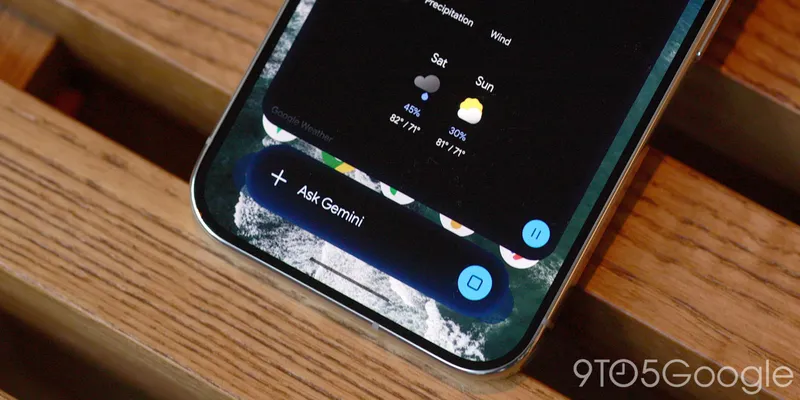 The pill-shaped search bar in the new panel has a more blurred appearance. Its borders are less defined than before, and there are more small colored dots and swirls in the background. When the animation ends, the edges of the bar appear transparent rather than a solid color. This appearance distinguishes the panel from the app icons on the home screen. If the update does not appear, users can force stop the Google app and reopen it. Users can create a text document, presentation, or spreadsheet without leaving the Gemini chat window. They can also preview and modify the result. Users can open the file in full-screen mode, manually edit a selected section, or ask the assistant questions about the text. Changes can also be made through written instructions. This allows the initial version of the file and the final revisions to be created within the same chat. The presentation slide creation and enhancement feature generates an outline, slide text, and a layout. Users can change the presentation’s style and structure with Gemini. They can then open the file in Google Slides and download it in PPTX or PDF format. The Google Sheets spreadsheet creation and export feature generates tracking tables, structured data, and data models based on a written prompt. Users can preview the result and open it directly in Google Sheets. The document and PDF editing section can be used to create PDF, Google Docs, LaTeX, Markdown, and TXT files. Files can be modified manually or through written instructions and uploaded to Google Drive. PDF previewing and editing work in both the web version and mobile apps. This level of functionality for Google Docs, Google Sheets, Google Slides, Markdown, TXT, and code files is available only in the web version.
The pill-shaped search bar in the new panel has a more blurred appearance. Its borders are less defined than before, and there are more small colored dots and swirls in the background. When the animation ends, the edges of the bar appear transparent rather than a solid color. This appearance distinguishes the panel from the app icons on the home screen. If the update does not appear, users can force stop the Google app and reopen it. Users can create a text document, presentation, or spreadsheet without leaving the Gemini chat window. They can also preview and modify the result. Users can open the file in full-screen mode, manually edit a selected section, or ask the assistant questions about the text. Changes can also be made through written instructions. This allows the initial version of the file and the final revisions to be created within the same chat. The presentation slide creation and enhancement feature generates an outline, slide text, and a layout. Users can change the presentation’s style and structure with Gemini. They can then open the file in Google Slides and download it in PPTX or PDF format. The Google Sheets spreadsheet creation and export feature generates tracking tables, structured data, and data models based on a written prompt. Users can preview the result and open it directly in Google Sheets. The document and PDF editing section can be used to create PDF, Google Docs, LaTeX, Markdown, and TXT files. Files can be modified manually or through written instructions and uploaded to Google Drive. PDF previewing and editing work in both the web version and mobile apps. This level of functionality for Google Docs, Google Sheets, Google Slides, Markdown, TXT, and code files is available only in the web version.