
21:06Machine-translated from Azerbaijani by AIRead in Azerbaijani
Markdown Files Can Now Be Opened Directly in Google Docs and Drive

Google has added support for directly opening Markdown (.md) files, which are widely used in artificial intelligence tools, in Google Docs and Google Drive. With the update, which began rolling out on October 5, these documents can be opened, edited and shared without being converted to another format. The feature is being made available to all Google Workspace users.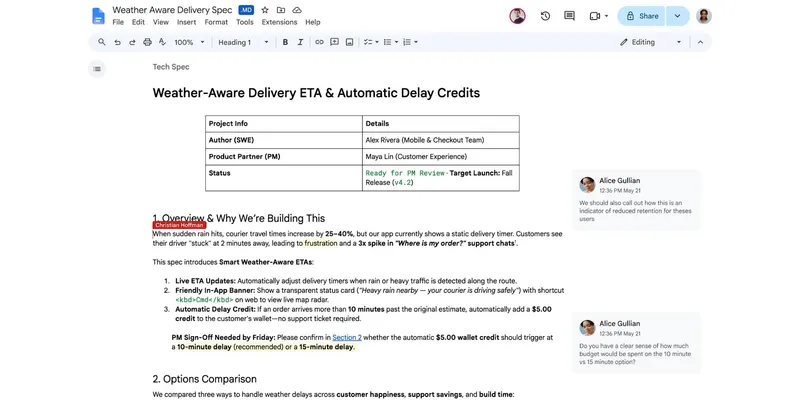 Headings, links and tables in Markdown files no longer appear as plain text. Links are clickable, and tables retain their structure. Users no longer need to learn the special characters used to create formatting. Google Docs also retains simultaneous editing and commenting features in these files. Google links this move to the growing use of artificial intelligence agents. An artificial intelligence agent is a program that performs tasks on behalf of a user, and such tools make extensive use of the .md format. The update makes it easier for people and agents to work on the same document. Files can also be synchronized with Gemini Notebook. The company calls Markdown a common language between people and artificial intelligence agents. Although Markdown support in Google Drive has expanded over the years, files previously generally had to be converted to Google Docs format. The company announced in April 2026 that Gemini would be able to create .md documents alongside other file types. Direct support reduces the need to switch between formats when working with documents. The update is enabled by default and is also active for administrator-controlled accounts. Therefore, the feature does not need to be enabled separately for organizational accounts. The update is rolling out in stages and may take up to 15 days after the initial release to reach all users. Some accounts will see the feature immediately, while others will receive it later.
Headings, links and tables in Markdown files no longer appear as plain text. Links are clickable, and tables retain their structure. Users no longer need to learn the special characters used to create formatting. Google Docs also retains simultaneous editing and commenting features in these files. Google links this move to the growing use of artificial intelligence agents. An artificial intelligence agent is a program that performs tasks on behalf of a user, and such tools make extensive use of the .md format. The update makes it easier for people and agents to work on the same document. Files can also be synchronized with Gemini Notebook. The company calls Markdown a common language between people and artificial intelligence agents. Although Markdown support in Google Drive has expanded over the years, files previously generally had to be converted to Google Docs format. The company announced in April 2026 that Gemini would be able to create .md documents alongside other file types. Direct support reduces the need to switch between formats when working with documents. The update is enabled by default and is also active for administrator-controlled accounts. Therefore, the feature does not need to be enabled separately for organizational accounts. The update is rolling out in stages and may take up to 15 days after the initial release to reach all users. Some accounts will see the feature immediately, while others will receive it later.